
Hermes Analyst Workflow Essentials
Sharing my personal experience training Hermes as my personal analyst Part V

Hermes recently achieved the #1 spot on OpenRouter global ranking the other day. It’s pretty clear at this point that Hermes is the best agent harness in the market. More and more people started using Hermes and realized how powerful it is.
With that said, it took me a while to figure out what’s important and what’s not, what offers the best ROI, and what’s a complete waste of time.
In today’s episode of Hermes my personal analyst, I’ll share things that give me the best ROI, ranked by importance.
Disclaimer: For anyone reading this series for the first time, I’m a researcher/investor. I use Hermes as a learning augment — he helps me surfaces insights and helps me consume information much faster than ever. His primary role is that of an investment/data analyst who knows my investment theses, my worldview, and my preferences. All final decision/trade execution lies with me (a human) as hallucinations can happen and I don’t trust AI enough to give them my wallets yet.
Last week’s Hermes article

Let’s dig in ↓
The Three-Layer Stack
Any useful agent has three layers:
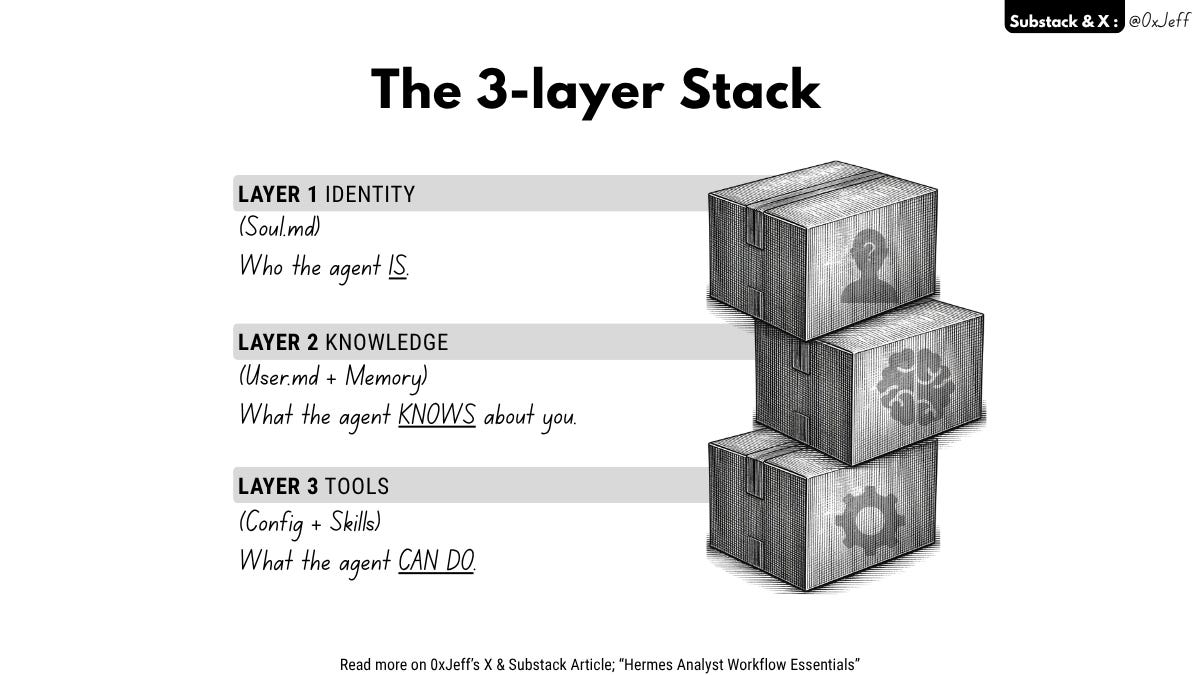
Layer 1 — Identity (Soul(.)md) (1/4)
Who the agent IS. Its personality, voice, constraints, values, knowledge of the user. This is the system prompt. It takes 2-3 hours to write well and you’ll revise it 5+ times. Highest ROI by a mile.
Layer 2 — Knowledge (User(.)md + Memory)
What the agent KNOWS about you. Your portfolio, your theses, your preferred sign-offs, your past mistakes. This compounds every session — the more you correct it, the better it gets. Time investment: high over time, but the first draft takes 30 minutes.
Layer 3 — Tools (Config + Skills)
What the agent CAN DO. API keys, cron jobs, browser access, Dune queries. This is where most people start and stop. Table stakes. Makes the agent capable but not differentiated.
Knowing what to focus on can make or break your Hermes agent.
What to focus on when setting Hermes up
1. Model Configuration
I spent the first week finding the right models for Hermes. I tried plugging it into Claude subscription (until they banned agent harnesses), tried many models on OpenRouter (free, open models, frontier models), tried Opencode Go, tried DeepSeek — all with the goal to optimize the cost while maintaining top inference quality for Hermes.
What I found
Start with Opencode Go, it’s only $5 for the first month and offers >$50 of inference value from top open models like Kimi k2.6 & GLM5.1 both great for long-running tasks or MiniMax 2.5 - 2.7 which are great for basic tasks (very fast). Set MiniMax 2.7 as basic usage and Kimi k2.6 or GLM5.1 as delegate_task for complex tasks
After Opencode Go, continue with DeepSeek (or just start with DeepSeek if you want) because they have sharp 75% discount on DeepSeek v4 Pro in May. DeeepSeek v4 Flash is fast & efficient at basic task and Pro is great for complex tasks
If you don’t wanna waste money at all, you can explore free models on OpenRouter. The only downside is that many people are usually using the free model which can be VERY SLOW at times OR you may get rate-limited/not be able to access it, they’re not reliable so it’s better to spend $5 for OpenCode Go.
The only down side to OpenCode go is the speed. Takes a bit of time for your prompt to go through (apparently the prompt goes to OpenCode and to Model Provider so it’s 2+ hops which take a little bit more time than direct model access).
There are 2 files you need to be mindful of (i) config.yaml (ii) .env
config.yaml is where you adjust the model provider and input your model API key
.env is your environment variable, you put in APIs from tools & models here
These 2 are important because it’s much faster for you to adjust the model provider and the model here than prompting Hermes to do so (saves you a lot of time & tokens if you do it yourself)
Oh.. forgot to mention, if you’re very concerned about privacy, use @AskVenice subscription. They have zero data retention policy + TEE so your prompts/data are private. They also have tokenized inference DIEM, 1 DIEM gets you $1 credit per day (if you want to invest + get credits at the same time)
I’m quite excited about @dphnAI because soon (in a month according to the team), POD will start to give platform credits for Dolphin inference network (similar to DIEM). It’s like 2 birds with 1 stone (i.e. investing in a growing private inference network while getting free inference credits)
2. Soul and User Configuration
If model config = the plumbing, soul & user config = the persona
In Hermes’ words:
“How I write, Jeff’s theses, the portfolio, the voice constraints (”no sounding smart like LLM”, “casual narrator voice”, “contrarian first”) — that’s the Soul layer. Without it, I’m a generic chatbot with tools. With it, I’m Jeff’s second brain that writes in his voice and knows what he’d care about before he finishes typing”
Soul(.)md = who the agent is → determines everything downstream
User(.)md = who you (the user) are → prevents re-explaining
Most people skipped this step. They installed Hermes, plugged in model API, connected some tools, and started using it. And then they wondered why Hermes is not impressive.
Spend an hour or two talking to Hermes about
The goal you’re trying to achieve with him
Who he is — an analyst, a writer, a coder, a general assistant
How he speaks — professional, casual (I fed him my articles so he talks like me)
Operating constraints — I have over a decade in PE/VC/IB so I like for Hermes to frame everything through the lens of unit economics
Investment theses, portfolio positions, risk tolerance — these get stored in User(.)md so Hermes knows what I’ll care about or what I’ll ignore
Soul and User configuration are never truly finished. I iterated on Soul 5-6 times already and User config gets updated every single day based on my positions + theses which may get invalidated or adjusted based on the market.
So yeah... take your time and talk to your Hermes. You’ll get to reflect, learn more about yourself, and be a better person at the end of it (plus you get a smart dynamic second brain that grows with you).
3. Skills
The coolest part about Hermes is that it automatically create skills for you. A skill is like a recipe that the agent can load and execute workflows without re-explaining anything. You do something once → if the agent thinks you’ll likely do it again → it creates a skill so that the 2nd time is a lot easier & faster
Skill can be a double-edged sword at times. If you’re experimenting with tools a lot early on, Hermes could be creating lots of skills, he could be remembering the tools API that don’t work well and could be creating cron jobs with it. If there are many skills and many scheduled cron jobs around, things can get messy & chaotic.
What I find very helpful is
Remembering the tools that’re great. If the agent choose a non-efficient way/tool to tackle a task, you can interrupt it and point it towards the right tool and tell him to remember for the next time
Explicitly tells Hermes to update cron jobs and update other workflows that rely on a tool once you change or adjust it
Constantly check for tools that don’t work, redundant texts, and unreliable workflows. Tell Hermes to work with sub-agent (via delegate task) to do a health check multiple times to ensure tools & workflows are in good shapes
You gotta remember that workflows can get bloated very quickly if you have too many tools/skills, especially ones that don’t work. Because every time you prompt it, it’ll waste tokens going through tools that don’t work.
4. Tools
Most tools are either free or freemium.
“Some” premium tools are gate-kept behind subscription, many offering generous credits for you to test them out.
Most of the tools I’m using are free. I have like 9-10 favorite tools but the best one so far is Browser Harness by @browser_use guys.
This is the most flexible tool out there, it gives your agent an ability to freely surf the web like a human, without getting blocked (there’s usually an annoying “Are you human” thingy that pops up on most sites that block AI - powered by Cloudflare).
If you want data from somewhere, do something on social media, or do anything on the internet, your agent can just use this tool, pretty handy.
The only downside is that it takes time. A direct tool for a specific job often do a much faster job (and/or much better job depending on the job).
I’m planning to share more about the tools that I use on “The Tool Shed”, a page on my Substack. Sharing it exclusively to my premium subscribers for now so if you’re interested to learn more, you can check that out.
Answering last week’s questions
Got a few questions on how X bookmark workflow works.

The short version: It uses X’s official API v2 to pull @0xJeff’s bookmarks every morning at 10am, deduplicates them by URL with a 30-day rolling window, and delivers just the listing (titles, handles, links) to Discord. No browser, no article extraction, no screenshots.
If there are any articles I want more details of, I’ll tell Hermes to summarize them.
Since X API can’t get the content of X articles directly, Browser Harness is used to extract X articles content and summarize them.
Wrapping it up
What I didn’t talk about here is Memory(.)md + external memory provider, crucial for retaining context across sessions & crucial for recalling & cross-referencing knowledge.
Happy to touch on the setup in more detail next week (if you guys want) but tl;dr ➝ I use Hindsight as external memory provider. The main use is for knowledge ingestion ➝ Hermes delivers reports + learn something new ➝ gets ingested to Hindsight. Hermes gets smarter everyday learning from top analysts + our discussions/tasks.
I find it useful to explicitly tell Hermes to “remember this” on important things it should remember. Have to bear in mind, Memory(.)md is intended to be a small file — only remembers things it should remember. Great thing about Hermes is that it trims stale memory or truncate them from time to time.
Anyway, that’s it for today. Thanks for reading and see you guys in the next one!
Thanks for checking out the article, if you have any feedback or questions, feel free to drop them below
Want to Continue Reading?
Check out the articles below (if you haven’t yet)
Hermes as the Ultimate Analyst — I’ve found the gist for my ultimate analyst
1 Month with Hermes — I’ve been using Hermes wrong all along
Hermes, $200 and 30 skills later — here are the 3 skills that’re worth it
3 Things I learnt after 3 weeks of using Hermes as a personal analyst
Disclaimer: This article is provided solely for informational and educational purposes and may not be redistributed, reproduced, or modified. The insights presented reflect our own research and judgment and should not be interpreted as endorsements or recommendations. Nothing in this article constitutes financial, investment, or professional advice. Market conditions are inherently uncertain, and asset values can fluctuate significantly including the possibility that an investment may decline substantially or even lose its entire value. All investments involve risk. Any financial decisions you make after reading this article are entirely your own, and we do not accept liability for any losses or results that may follow. Readers should conduct their own independent research before making any financial decisions.
If you’re having any trouble with email delivery, payments, cancellations, un-subscriptions, or refunds, the best first stop is the Substack Help Center for Subscribers or Substack Support as they are great at sorting out those issues.
If your concern isn’t fully resolved or you need additional help regarding your subscription, we are here for you. Just reply to this email (if you’re reading it in your inbox) or send us a message through our Substack page.
Getting in touch with us helps ensure any issue is addressed promptly and that your access to our future activities and community channels continues smoothly.